
Learn how to calculate the P&L and the cost of a trade in commodities based on the table of assets.
Review the table of assets and spreads
Go to the table of assets.
Click the "Commodities" tab to access information about commodities.
The columns you'll need to check out for this calculation are the following:
- Tick value
- Swap long
- Swap short
- Commission
Additionally, you'll need to know the number of contracts (lots) you are trading. The table indicates both the standard contract size and the minimum tradeable size.
Calculate the trade's P&L
All commodities trade in US dollars thus the P&L we'll calculate will be in US dollars.
Based on tick value
The tick is the last decimal of the price.
Calculate the P&L of the trade by multiplying the ticks gained or lost by the tick value and the number of contracts.
When buying 2 contracts of XAUUSD at 1200.00 and selling at 1210.00 (1000 ticks):
1000 ticks 1 USD (tick value) 2 contacts= 2000 USD
Based on price
Another way of calculating P&L of a trade is based on its price according to the formula (close price - open price) / open price * trade value.
To calculate the trade value, just multiply the contract size by the open price and the number of contracts.
When buying 2 contracts of XAUUSD at 1200.00 (trade value is 100 * 1200.00 * 2) and selling at 1210.00:
(1210.00 - 1200.00) / 1200.00 * 100 * 1200.00 * 2 = 2000 USD
Choose how to display P&L in Metatrader
To display the P&L of trades in commodities in the Metatrader terminal you may choose between points (ticks), term currency (USD) or deposit currency.
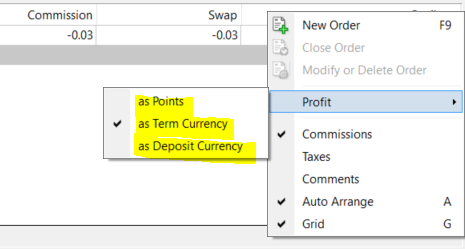
'Profit' in Metatrader does not include the cost of a trade.
Only the amount that appears in bold in the last row of the 'Profit' column includes the whole cost (commission and swap).

Calculate the cost of a trade
The cost of a trade consists of commission + swap.
Commission
For commodities, the commission rate is based on a percentage of trade value — check the table of assets for the current rate.
The whole commission gets charged at the opening of the trade and no additional commission is charged afterwards.
To calculate the commission, multiply the trade value by the current commission rate (see the table of assets for the latest rate).
In order to calculate the trade value, just multiply the contract size by the open price and the number of contracts. When opening 2 contracts of XAUUSD at 1200.00:
100 * 1200.00 * 2 * commission rate = commission in USD
The commission is always displayed in the base currency in the MetaTrader terminal.
Swap or rollover
When holding on to positions for longer than a day, investors borrow an asset (on which interest is payable) to invest in another (on which they earn interest).
Swap for commodities is charged daily and in triple size on Wednesdays (Fridays for XAUUSD), with net interest settled on a daily basis at 21:00 UTC showing the difference between interest paid and earned.
Swap settlement is positive whenever interest earned on the invested asset exceeds interest on the borrowed asset - the investor gets paid. However, the swap is a cost whenever the opposite is true.
To calculate the swap charged when a trade remains open at the daily market rollover (21:00 UTC), use the following formula: swap rate (as shown in the table of assets) x number of contracts.
For example, if the swap long rate for XAUUSD is -0.50 USD per contract per day and you are holding 2 contracts:-0.50 x 2 = -1.00 USD per day
The swap displayed in the Metatrader terminal is the swap accumulated over the days the trade was open upon daily market rollover (21:00 UTC), but the rate charged each day may be different.

The swap for the current day can be checked out in the table of assets and is updated usually during the afternoon.
Swap is always displayed in the base currency in the MetaTrader terminal.