Trade directly from your internet browser
Click the Log In button to connect to your account.
The MetaTrader web platform allows you to trade from any browser and operating system (Windows, Mac, Linux) with no additional software, accessing your account and starting to trade in just a couple of clicks. All you need is an Internet connection.
The MetaTrader web version has all the advantages of the native solution since it is a regular part of the desktop platform. This ensures the web platform's high reliability and compatibility with the entire MetaTrader ecosystem. The application is safe to use - all transmitted data is securely encrypted.
MetaTrader web trading features
- Trading directly via a browser
- Compatibility with any operating system
- Reliable data protection
- One Click Trading
- History of trading operations
- Multiple built-in indicators for technical analysis
- Graphical objects
- All types of trading operations
- Real-time quotes in Market Watch
- Multiple timeframes
How to access your Darwinex MT4 / MT5 web trading account
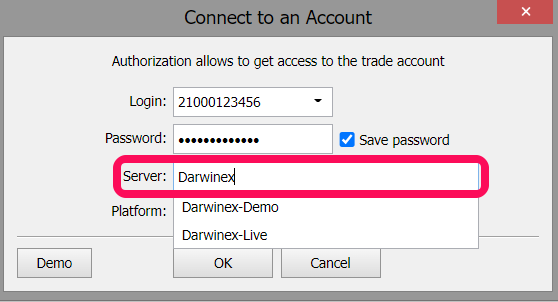
To access your Darwinex MT4 / MT5 web trading account, follow these three steps:
- Visit
https://www.darwinex.com/webterminal - Fill in your Darwinex MT4 / MT5 account number and password
- Choose "Darwinex-Live" or "Darwinex-Demo" in the dropdown menu: